

本文摘要1.web station先运行自己的网站如题所示2.ssh链接群辉3.定位站点的Service UUIDsudo -i # 搜索包含域名的配置段落 nginx -T | grep -C 20 "blog.nobb.cc"示例:root@NAS:/usr/local/etc/nginx/conf.d/f3aggd9d-daa7-4224-a11c-65797f58f4a1# n...
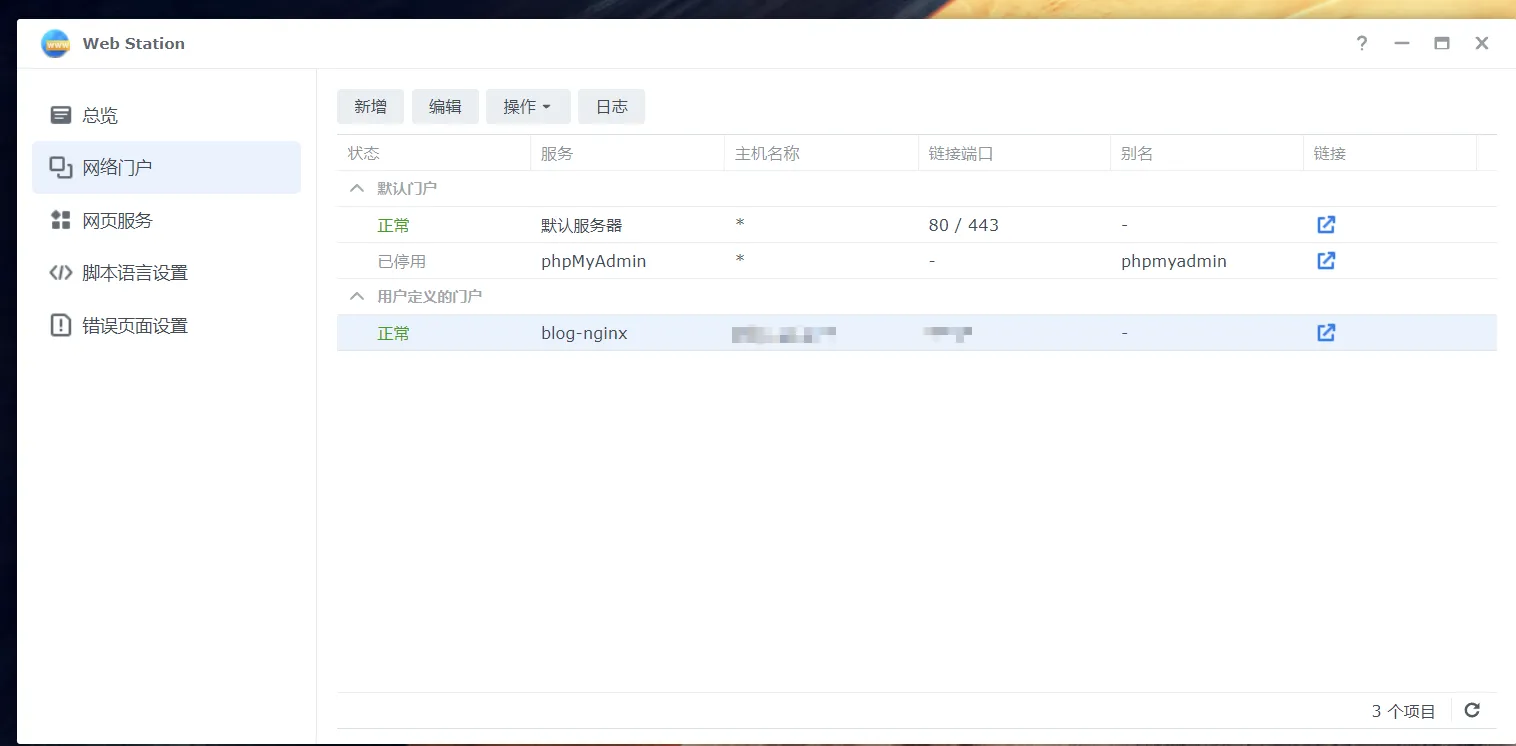
1.web station先运行自己的网站
如题所示
2.ssh链接群辉
3.定位站点的Service UUID
sudo -i
# 搜索包含域名的配置段落
nginx -T | grep -C 20 "blog.nobb.cc"
示例:
root@NAS:/usr/local/etc/nginx/conf.d/f3aggd9d-daa7-4224-a11c-65797f58f4a1# nginx -T | grep -C 20 "test.nobb.cc"
nginx: [warn] duplicate extension "wasm", content type: "application/wasm", previous content type: "application/wasm" in /etc/nginx/mime.types:101
nginx: [warn] low address bits of 192.168.31.197/24 are meaningless in /etc/nginx/conf.d/dsm.ssdp.conf:2
nginx: [warn] low address bits of 192.168.31.196/24 are meaningless in /etc/nginx/conf.d/dsm.ssdp.conf:3
nginx: [warn] low address bits of 169.254.233.59/16 are meaningless in /etc/nginx/conf.d/dsm.ssdp.conf:4
nginx: [warn] low address bits of 192.168.31.197/24 are meaningless in /etc/nginx/conf.d/dsm.ssdp.conf:2
nginx: [warn] low address bits of 192.168.31.196/24 are meaningless in /etc/nginx/conf.d/dsm.ssdp.conf:3
nginx: [warn] low address bits of 169.254.233.59/16 are meaningless in /etc/nginx/conf.d/dsm.ssdp.conf:4
nginx: [warn] low address bits of 192.168.31.197/24 are meaningless in /etc/nginx/conf.d/dsm.ssdp.conf:2
nginx: [warn] low address bits of 192.168.31.196/24 are meaningless in /etc/nginx/conf.d/dsm.ssdp.conf:3
nginx: [warn] low address bits of 169.254.233.59/16 are meaningless in /etc/nginx/conf.d/dsm.ssdp.conf:4
nginx: [warn] low address bits of 192.168.31.197/24 are meaningless in /etc/nginx/conf.d/dsm.ssdp.conf:2
nginx: [warn] low address bits of 192.168.31.196/24 are meaningless in /etc/nginx/conf.d/dsm.ssdp.conf:3
nginx: [warn] low address bits of 169.254.233.59/16 are meaningless in /etc/nginx/conf.d/dsm.ssdp.conf:4
nginx: the configuration file /etc/nginx/nginx.conf syntax is ok
nginx: configuration file /etc/nginx/nginx.conf test is successful
                alias   /var/packages/WebStation/target/error_page/;
        }
        location ~* \.(php[345]?|phtml)$ {

                fastcgi_pass unix:/run/php-fpm/php-c8ee43d4-3a22-40e1-a85c-9d322a7c8d5c.sock;

        }
        location ~* \.cgi {
                fastcgi_pass unix:/run/fcgiwrap.sock;
        }
}

# configuration file /etc/nginx/sites-enabled/webservice_portal_7b30c446-b332-4671-9820-ffcc3be801c8:


server {

    listen      2828 ssl;
    listen      [::]:2828 ssl;

    server_name test.nobb.cc ;

    if ( $host !~ "(^test.nobb.cc$)" ) { return 404; }

    error_log /var/packages/WebStation/var/log/nginx_error_log warn;

    include /usr/syno/etc/www/certificate/WebStation_7b30c446-b332-4671-9820-ffcc3be801c8/cert.conf*;

    include /usr/syno/etc/security-profile/tls-profile/config/WebStation_7b30c446-b332-4671-9820-ffcc3be801c8.conf*;

    ssl_prefer_server_ciphers   on;

    include conf.d/.webstation.error_page.default.conf*;

    include conf.d/.webstation.error_page.default.resource.conf*;

    include conf.d/.service.7b30c446-b332-4671-9820-ffcc3be801c8.f3aggd9d-daa7-4224-a11c-65797f58f4a1.conf*;

}


# configuration file /usr/syno/etc/www/certificate/WebStation_7b30c446-b332-4671-9820-ffcc3be801c8/cert.conf:
ssl_certificate          /usr/syno/etc/www/certificate/WebStation_7b30c446-b332-4671-9820-ffcc3be801c8/fa9f605e-39eb-4ba0-b46d-8ab3c73beca4.pem;
在输出中,我们找到了处理 test.nobb.cc的门户配置文件,并发现它引用了一个隐藏的服务配置文件: include conf.d/.service.7b30c446-b332-4671-9820-ffcc3be801c8.f3aggd9d-daa7-4224-a11c-65797f58f4a1.conf*
这里f3aggd9d-daa7-4224-a11c-65797f58f4a1就是我们目标站点的 Service UUID 。
4.创建持久化配置目录
群晖系统在每次更新 Web Station 设置时都会重写 .conf 文件,但它不会删除用户手动创建的UUID目录。
此处内容已经被作者隐藏,请输入验证码查看内容
验证码:

5.编写伪静态规则
在创建user.conf时,如果使用传统的rewrite ^(.*)$ /index.php$1 last;在群晖环境下极易触发 Internal Redirection Cycle(内部重写死循环) ,导致 PHP 日志报一长串的 /index.php/index.php...。
伪静态代码为:
6.重启nginx
# 1. 语法检查(看到 syntax is ok 字样再继续)
nginx -t

# 2. 重新加载 Nginx
synosystemctl reload nginx
7.总结
不要直接改主配置文件/etc/nginx/sites-enabled/下的文件重启或修改 Web Station 设置后会丢失,必须用 UUID 文件夹 + user.conf 的方式。
善用 nginx -T:这是在群晖乱码般的配置文件中找到自己站点的唯一明灯。
优先使用try_files:它可以完美解决 rewrite 规则在 Nginx 嵌套路径下容易产生的死循环报错。
8.通用自动化脚本
通用版一键脚本,自动抓取任何站点的 Service UUID。
typecho_rewrite.sh
此处内容需付费后阅读
觉得内容不错?我要
打赏杯咖啡或蜜雪冰城吧
微信扫一扫

支付宝扫一扫


![[群辉nas]cloud sync使用webdav加密模式提示“上传加密密钥失败”解决办法](https://img.nobb.cc/blog/typecho/uploads/2025/02/3077836130.webp)
![[群辉nas]为知笔记docker搭建教程(附带破解vip攻略)](https://img.nobb.cc/blog/typecho/uploads/2025/01/204845704.png)
![[群辉NAS]5分钟搞定NAS同步阿里云网盘webdav](https://img.nobb.cc/blog/typecho/uploads/2022/09/3018133882.jpg)

公众号关注了,回复的验证码输入上去点不开哇,牢大!
@佚名 已修复!::(哈哈)
@佚名 不好意思 确实存在bug 立刻修复 麻烦晚点重新尝试
伪静态真的好难设置,而且容易忘记,能够有一个工具配置那是最好不过了。
@ymz316 得亏有AI,经历九九八十一难后终于知道怎么设置,于是整理了下发了出来。另外新春快乐呀!